
目录
- JVM和DVM的不同
- Android如何启动一个应用
- UI Thread 如何工作
- UI Thread 消息机制 API 概览
- 阐述 MessageQueue.IdleHandler
- Android 平台如何调度线程
- Android下线程有哪些通信方式
- 进程间如何通信
- Android 如何管理内存
1. JVM和DVM的不同
- JVM is a stack-based machine; while DVM is register-based(执行相同任务比JVM使用更少的指令);
- A stack-based virtual machine must transfer data from registers to the operand stack before manipulating them. In contrast, a register-based VM operates by directly using virtual registers. This increases the relative size of instructions because they must specify which registers to use, but reduces the number of instructions that must be executed to achieve the same result.
2. Android如何启动一个应用

- Android启动时将率先运行一个独特的进程Zygote。而Zygote将启动一虚拟机,该虚拟机将预先加载Android核心库并初始化各种共享资源体,最后它将使用套接字进行监听。
- 当用户启动一个Android应用时,Zygote将创建一个虚拟机(通过写时复制(Copy-On-Write)的技术拷贝Zygote虚拟机)以便其运行,并以子进程的身份和其父进程共享内存。
3. UI Thread 如何工作
UI Thread 由平台内部 android.app.ActivityThread 类管理。
- 默认情况下,为Android应用开发的代码都会通过主线程(UI Thread)运行;
- 如果应用不能在5秒内响应用户,那么用户将会看到一个显示ANR对话框并提供退出选项以允许用户终止该应用;
- Android设计致力于同步人眼与硬件(屏幕)刷新率,这意味着Android每秒绘制屏幕60帧数;
- Android平台线程通信拥有自己的处理机制(Message Passing Mechanism)。该机制以非阻塞生产者消费者模式实现,其生产者和消费者在消息传送时都不会被阻塞;另外生产者可往消息队列在任意时间任意位置中插入新的消息;
- API 16之后,Android引进了一个新的Choreographer对象以监控帧数时序,并在连续丢掉30帧后在日志中予以丢帧的警告;
The UI thread Looper
- UI Thread是唯一默认装配了Looper的线程,并且先于应用组件的初始化,另外该 Looper 不能通过 Looper.quit() 终止,否则抛出 RuntimeException;
- 关于UI Thread Looper和其它线程Looper的几点实用性区别: UI Thread Looper通过Looper.getMainLooper()可从任意位置获取;并且Looper是Android运行时环境是通过Looper.prepareMainLooper()方法装配的. 每一个应用只能进行装配一次,因此试图为其它线程装配将会抛出异常;
在 UI Thread 上捕捉异常
- 当应用启动时,Android 运行时有一个全局对象 UncaughtExceptionHandler。默认情况下,它将杀死该进程。
- 但我们可以对其进行覆盖方法。典型地,覆盖方法应该只是增加一些功能。示例如下:
|
|
如何查看 UI Thread
下面名为 com.eat 默认就是应用启动时的 UI Thread。
|
|
与UI Thread通信代码片段
|
|
4. UI Thread 消息机制 API 概览
android.os.Handler: 消费者线程消息处理器,提供接口予以生产者线程往队列插入消息. 一个Looper或许有多个与之关联的Handler,但只有一个队列。
android.os.Looper: 一次只有一个并只与消费者线程关联的消息分发器。
android.os.MessageQueue: 无边界链表结构,每一个Looper和线程最多拥有一个消息队列。
android.os.Message: 在消费者线程进行消费的消息。
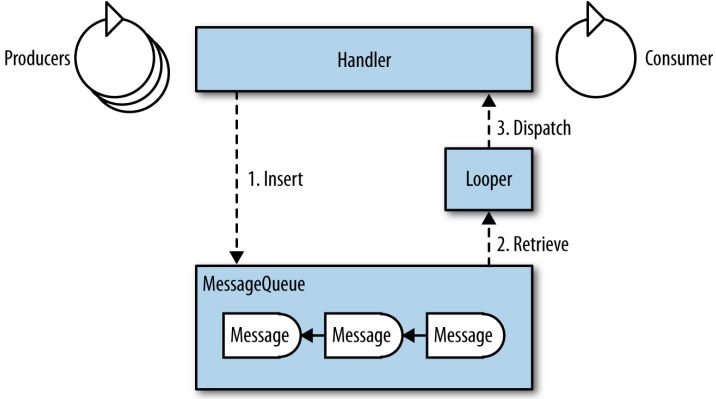
- Insert: 生产者线程通过与消费者线程关联的Handler往队列插入消息。
- Retrieve: 通过Looper顺序地从队列取出消息以供消费者线程消费。
- Dispatch: 由Looper负责保证将消息分发到正确的Handler。
|
|
5. 阐述 MessageQueue.IdleHandler
如果当前没有消息要处理,这时,消费者线程将处于空闲时段,与其等待消息的道来,其它线程将会在此空闲时段获得机会执行。
When the message queue detects idle time for the consumer thread, it invokes queueIdle() on all registered IdleHandler-instances. It is up to the application to implement the callback responsibly.
|
|
6. Android 平台如何调度线程
Priority:更改线程执行的优先级
- java.lang.Thread:
- setPriority(int priority); // from 0 (least prioritized) to 10 (most prioritized).
- android.os.Process
- Process.setThreadPriority(int priority); // 在执行的线程里.
- Process.setThreadPriority(int threadId, int priority);
Control group:更改线程所属的控制组(control group,Android 特有)
- Android 自定义了很多控制组,但最重要的是前端(Foreground)控制组和后端(Background)控制组。
- 默认创建的线程和 UI Thread 拥有相同的优先级和控制组,因此它们将为获得处理器资源而互相竞争。为了避免大量后台线程影响 UI Thread 的性能,可通过如下方式解决。
- 更改所属控制组:Process.setThreadPriority(Process.THREAD_PRIORITY_BACKGROUND)
|
|
7. Android下线程有哪些通信方式(数据结构)
管道
|
|
共享内存
信号量(该技术被认为是最容易出错的技术)
- synchronized: Object.wait() / Object.wait(timeout); Object.notify() / Object.notifyAll()
- ReentrantLock: Condition.await() / Condition.await(timeout); Condition.signal() / Condition.signalAll()
- ReentrantReadWriteLock: Condition.await() / Condition.await(timeout); Condition.signal() / Condition.signalAll()
阻塞队列
|
|
Android Message Passing(参考第4题)
- The lifecycle of a message: create(initialized) -> enqueue(pending) -> dispatch(dispatched) -> recycle(recycled) -> (initialized)
创建消息的 API:
Message m = new Message();
Message m = Message.obtain(); // empty message
Message m = Message.obtain(Handler h);
Message m = Message.obtain(Handler h, int what);
Message m = Message.obtain(Handler h, int what, Object o);
Message m = Message.obtain(Handler h, int what, int arg1, int arg2);
Message m = Message.obtain(Handler h, int what, int arg1, int arg2, Object o);
Message m = Message.obtain(Handler h, Runnable task); // task message
Message m = Message.obtain(Message originalMsg); // copy constructor
Handler
- Constructors without an explicit Looper bind to the Looper of the current thread: new Handler(); 或 new Handler(Handler.Callback)
- Constructors with an explicit Looper bind to that Looper: new Handler(Looper); 或 new Handler(Looper, Handler.Callback);
- Message insertion, The sorting is based on the time parameter, and it is the only way an application can affect the dispatch order: default(Immediately eligible for dispatch),at_front(dispatch at time 0. Hence, it will be the next dispatched message, unless another is inserted at the front before this one is processed), delay(The amount of time after which this message is eligible for dispatch),uptime(The absolute time at which this message is eligible for dispatch)
|
|
|
|
8. 进程间如何通信
Android RPC
- IPC由Linux系统管理,支持以下几种IPC机制: signals, pipes, message queues, semaphores, and shared memory. 而经过修改过的Android版Linux,其IPC机制已被替换为binder框架,该框架使用RPC方式在进程间通信。IPC可以是双通道的。
RPC方式通信包含以下步骤:
- Method and data decomposition, also known as marshalling
- Transferring the marshalled information to the remote process
- Recomposing the information in the remote process, also known as unmarshalling
- Transferring return values back to the originating process
Binder
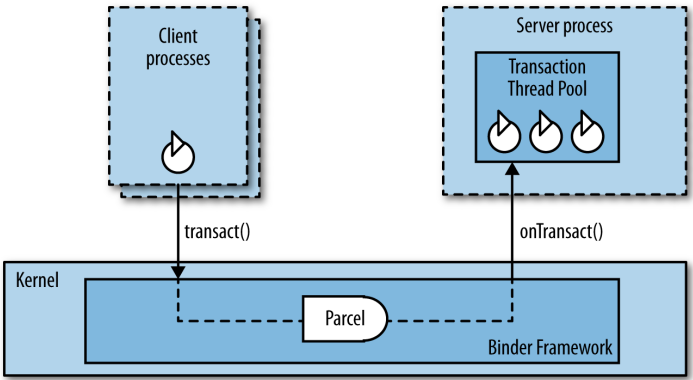
- 客户端线程在交互时默认是阻塞的,直到远程的线程完成onTransact()方法。
- 交互数据由对象android.os.Parcel组成, 该对象经过优化以便通过Binder和进程交互。
- onTransact()方法在binder线程池中的某一线程执行。该线程池存在的意义只在于为了处理从其它进程而来的消息;并且它最多只能有16个线程。
|
|
AIDL(Android Interface Definition Language)
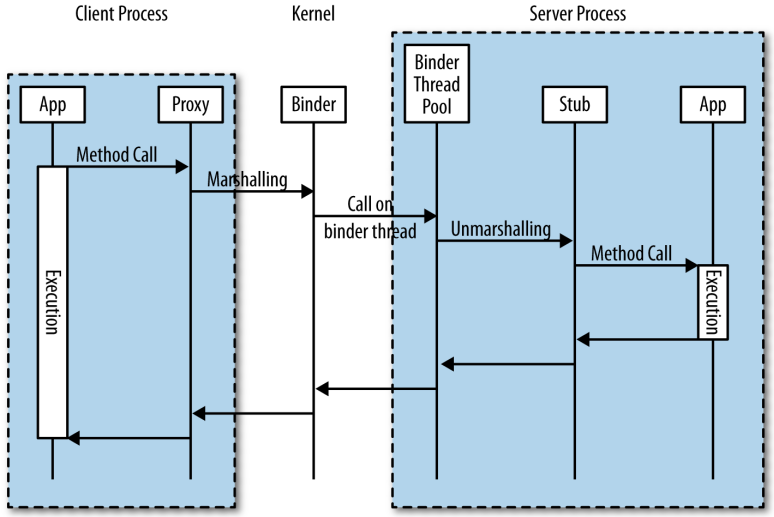
- The generated Java interface is included in all the client applications and in the server application. The interface file defines two inner classes, Proxy and Stub, that handle all the marshalling and unmarshalling of the data, as well as the transaction itself.
|
|
异步 RPC(在 AIDL 中通过关键字 oneway 定义)
|
|
9. Android 如何管理内存
内存泄漏的广泛定义:
- 内存没有被回收;
- 内存一次分配过多,有可能导致内存耗尽;
- GC 使用标记-清扫方式(mark-and-sweep);
- 其标记工作方式如下图所示
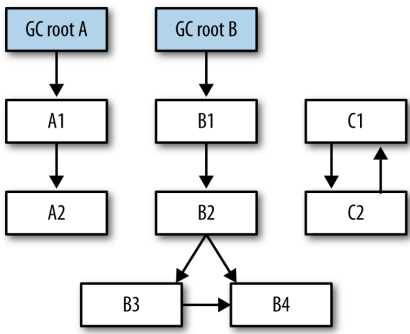
注:任何可以在堆(heap)外访问到的对象都统称为 GC root,这包括静态对象(static objects)、在堆栈的本地对象(local objects)和线程。
GC root A→A1→A2
GC root B→B1→B2→B3→B4
GC root B→B1→B2→B4
与线程相关的内存泄漏
- 当线程执行时,线程对象本身便成为GC root,所有线程创建的相关对象都将被标记为不可回收;
- 当线程实现为内部类时,该线程对象将持有其外部类对象的引用,因此,只要线程不终止,外部类对象将不可回收;
- 当线程实现为静态内部类时,线程对象持有外部类的引用,但不是外部类对象,因此外部类对象在没有其它引用链接它时可被回收;但如果程序员想将线程执行的环境(Thread)和执行对象(Runnable)分开,并将执行对象实现为内部类时,该执行对象将获得对线程外部类对象的一个引用,从而导致外部类对象不可被回收, 如下示例;
|
|
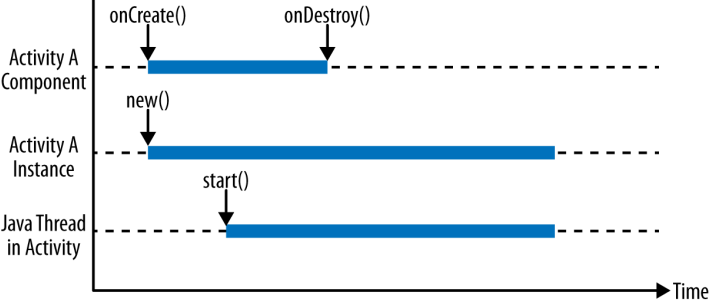
- Android 应用组件与线程之间生命期的不协调,比如下图所示,Activity 对象在生命期结束后(onDestroy())仍然停留在堆上,其原因是 Activity 在活动期间启动的一线程仍在运行当中。
|
|
如何避免内存泄漏
- 使用静态内部类;
- 使用弱引用(Weak References);显式置空强引用(strong references);
- 及时停止线程执行;