Android 面试题记录 (三)

1. 关于 Service 的一些细节

  • Service 的种类:Started Service 和 Bound Service,分别对应于 Context.startService(Intent) 和 Context.bindService;
  • 如果一个 Service 在 onStartCommand 执行的过程中被终止,则已提交的 Intent 将得不到机会启动,该 Intent 仍会被视为一个挂起的请求,而非一个已启动的请求(started request);
1
2
3
4
5
6
7
8
9
10
11
12
13
14
15
16
17
// Started Service
public class StartedEatService extends Service {
@Override public int onStartCommand(Intent intent, int flags, int startId) { ... }
@Override public IBinder onBind(Intent intent) { return null; }
}
// return value of onStartCommand:
// 1. START_STICKY,Service 将以新进程的形式予以重新启动而不管是否有任何挂起的请求,
// 被终止的请求将不会重新提交,如果有挂起的请求,flags 值将被设置为 START_FLAG_RETRY,
// 如果没有任何挂起的请求,重新启动后,onStartCommand 的 Intent 值为 null;
// 2. START_NOT_STICKY,与上一个 flag 相同,但有一个区别是,Service 只在有挂起的请求时才重新启动;
// 3. START_REDELIVER_INTENT,将为那些挂起的请求或正在执行的而没有完成的请求重新启动,
// 其中挂起的请求,flags 值将设置为START_FLAG_RETRY,而未完成的请求则为 START_FLAG_REDELIVERY;
//
public class BoundService extends Service {
@Override public IBinder onBind(Intent intent) { /* Return communication interface */ }
@Override public boolean onUnbind(Intent intent) { /* Last component has unbound */ }
}

Local Binding

1
2
3
4
5
6
7
8
9
10
11
12
13
14
15
16
17
18
19
20
21
22
23
24
25
26
27
28
29
30
31
32
33
34
35
36
37
38
39
40
41
42
43
44
45
46
47
48
49
50
51
52
53
54
55
56
57
58
59
60
61
62
63
64
65
66
67
68
69
70
71
72
73
74
75
76
77
78
79
80
public class BoundLocalService extends Service {
private final ServiceBinder mBinder = new ServiceBinder();
public IBinder onBind(Intent intent) {
return mBinder;
}
public class ServiceBinder extends Binder {
public BoundLocalService getService() {
return BoundLocalService.this;
}
}
public void publishedMethod1() { ... }
public void publishedMethod2() { ... }
public interface OperationListener {
public void onOperationDone(int i);
}
public void doLongAsyncOperation(final int i,
final OperationListener listener) {
new Thread(new Runnable() {
@Override public void run() {
int result = longOperation(i);
listener.onOperationDone(result);
}
}).start();
}
private int longOperation(int i) {
// Return a result from the long operation.
}
}
public class BoundLocalActivity extends Activity {
private LocalServiceConnection mLocalServiceConnection = new LocalServiceConnection();
private BoundLocalService mBoundLocalService;
private boolean mIsBound;
public void onCreate(Bundle savedInstanceState) {
super.onCreate(savedInstanceState);
bindService(new Intent(BoundLocalActivity.this, BoundLocalService.class),
mLocalServiceConnection, Service.BIND_AUTO_CREATE);
mIsBound = true;
}
@Override protected void onDestroy() {
super.onDestroy();
if (mIsBound) {
try {
unbindService(mLocalServiceConnection);
mIsBound = false;
} catch (IllegalArgumentException e) {
// No bound service
}
}
}
private class LocalServiceConnection implements ServiceConnection {
@Override public void onServiceConnected(ComponentName componentName, IBinder iBinder) {
mBoundLocalService = ((BoundLocalService.ServiceBinder)iBinder).getService();
// 这个时候便可以调用 Service 里的方法了,比如 publishedMethod1 and publishedMethod2.
}
@Override public void onServiceDisconnected(ComponentName componentName) {
mBoundLocalService = null;
}
}
private static class ServiceListener implements BoundLocalService.OperationListener {
private WeakReference<BoundLocalActivity> mWeakActivity;
public ServiceListener(BoundLocalActivity activity) {
this.mWeakActivity = new WeakReference<BoundLocalActivity1>(activity);
}
@Override public void onOperationDone(final int someResult) {
final BoundLocalActivity localReferenceActivity = mWeakActivity.get();
if (localReferenceActivity != null) {
localReferenceActivity.runOnUiThread(new Runnable(){
@Override public void run() {
// Update on the UI thread
}
});
}
}
}
public void onClickExecuteOnClientUIThread(View v) {
if (mBoundLocalService != null) {
mBoundLocalService.doLongAsyncOperation(new ServiceListener(this));
}
}
}

IntentService

  • IntentService 的 executor 是 HandlerThread。另外不像 AsyncTask,IntentService 的 executor 是可以有多个实例的。
  • 重新启动未完成的请求时,需要在 onHandleIntent 中设置:setIntentRedelivery(true);
1
2
3
4
5
6
7
8
9
public class SimpleIntentService extends IntentService {
public SimpleIntentService() {
super(SimpleIntentService.class.getName());
setIntentRedelivery(true);
}
@Override protected void onHandleIntent(Intent intent) {
// Called on a background thread
}
}
  • BroadcastReceiver 可以是应用程序的入口,它可以是应用创建的第一个组件(在 Activity 之前)。但该组件只在 onRecive 方法中保持活动,如果在该组件中执行异步任务,那么有可能在组件声明结束后,该组件所在的进程变为空进程,从而导致运行时在异步任务未完成时杀死该进程,以致丢失任务;
  • 为解决此情况,BroadcastReceiver 与 IntentService 的结合是一个理想的解决办法。

2. 关于 Loader

  • 特征:当有新的数据(或数据更新)时,自动触发回调;当 Activity 或 Fragment 停止时,自动停止;必要时缓存数据(Activity 配置变更时);避免了与线程相关的内存泄漏(仍有可能会在 Activity 变更配置重新生成时发生内存泄漏);
  • 包含:LoaderManager(抽象类), Loader, AsyncTaskLoader, 和 CursorLoader 类
  • 生命期:reset -> start <-> stop -> abandon -> reset
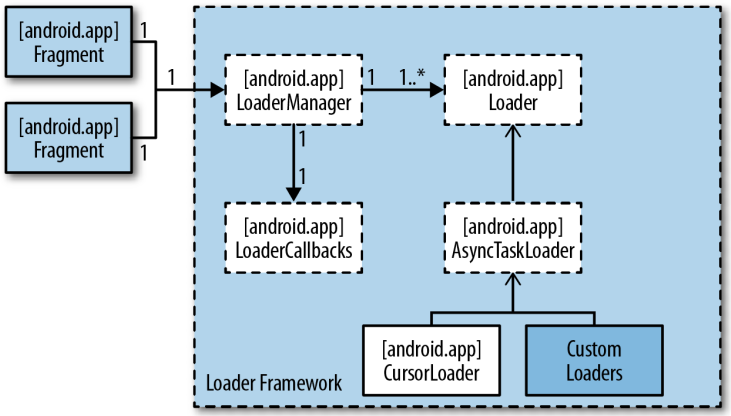
Loader 框架

LoaderManager

  • LoaderManager getLoaderManager();
  • Loader initLoader(int id, Bundle args, LoaderCallbacks callback),如果识别码符合则可重用已有的 Loader
  • Loader restartLoader(int id, Bundle args, LoaderCallbacks callback),不可重用,如果已有 Loader,该 Loader 将被销毁(包括数据)并重新创建一个新的;
  • Loader getLoader(int id)
  • void destroyLoader(int id)

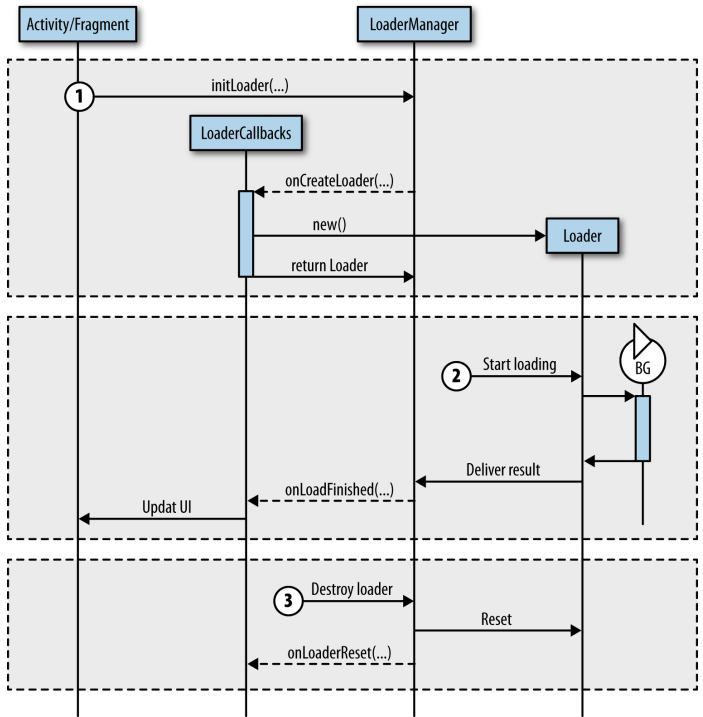
事件序列

  • Loader 初始化:由 LoaderManager.initLoader 触发;
  • 加载数据:客户可使用 Loader.forceLoad() 强制加载新的数据;客户同样可调用 Loader.cancelLoad() 取消加载;
  • 重置 Loader

Loader 回调事件序列

1
2
3
4
5
6
7
8
9
10
11
12
13
14
15
16
public class SkeletonActivity extends Activity implements LoaderManager.LoaderCallbacks<D> {
private static final int LOADER_ID = 0;
public void onCreate(Bundle savedInstanceState) {
getLoaderManager().initLoader(LOADER_ID, null, this);
}
// LoaderCallback methods
public Loader<D> onCreateLoader(int id, Bundle args) {
/* TODO: Create the loader. */
}
public void onLoadFinished(Loader<D> loader, D data) {
/* TODO: Use the delivered data. */
}
public void onLoaderReset(Loader<D> loader) {
/* TODO: The loader data is invalid, stop using it. */
}
}

AsyncTaskLoader

  • 加载可以因为内容变更或用户调用 forceLoad() 而触发,因此,频繁的更新或许使得 UI Thread 失去响应能力,这时,可以使用延时加载以解决:setUpdateThrottle(long delayMs)。

CursorLoader(见下面 ContentProvider 一节)

自定义 Loader

  • 后台加载(AsyncTaskLoader):public D loadInBackground() { … }
1
2
3
4
5
6
7
8
9
10
11
12
13
14
15
16
17
public class BasicLoader extends AsyncTaskLoader<Integer>{
public BasicLoader(Context context) {
super(context);
}
@Override protected void onStartLoading() {
super.onStartLoading();
forceLoad();
}
@Override public Integer loadInBackground() {
return loadDummyData();
}
private int loadDummyData() {
SystemClock.sleep(1000);
Random rand = new Random();
return rand.nextInt(50);
}
}

自定义 File Loader

1
2
3
4
5
6
7
8
9
10
11
12
13
14
15
16
17
18
19
20
21
22
23
24
25
26
27
28
29
30
31
32
33
34
35
36
37
38
39
40
41
42
43
44
45
46
47
48
49
50
51
52
53
54
55
56
57
public class FileLoader extends AsyncTaskLoader<List<String>> {
private List<String> mFileNames; // Cache the list of file names.
private class SdCardObserver extends FileObserver {
public SdCardObserver(String path) {
super(path, FileObserver.CREATE|FileObserver.DELETE);
}
@Override public void onEvent(int event, String path) {
// This call will force a new asynchronous data load
// if the loader is started otherwise it will keep
// a reference that the data has changed for future loads.
onContentChanged();
}
}
private SdCardObserver mSdCardObserver;
public FileLoader(Context context) {
super(context);
String path = context.getFilesDir().getPath();
mSdCardObserver = new SdCardObserver(path);
}
@Override protected void onStartLoading() {
super.onStartLoading();
// Start observing the content.
mSdCardObserver.startWatching();
if (mFileNames != null) {
// Return the cache
deliverResult(mFileNames);
}
if (fileNames == null || takeContentChanged()) {
forceLoad();
}
}
@Override public List<String> loadInBackground() {
File directory = getContext().getFilesDir();
return Arrays.asList(directory.list());
}
@Override public void deliverResult(List<String> data) {
if (isReset()) {
return;
}
mFileNames = data; // Cache the data
if (isStarted()) { // Only deliver result if the loader is started.
super.deliverResult(data);
}
}
@Override protected void onStopLoading() {
super.onStopLoading();
cancelLoad();
}
@Override protected void onReset() {
super.onReset();
mSdCardObserver.stopWatching();
clearResources();
}
private void clearResources() {
mFileNames = null;
}
}

3. 关于 BroadcastReceiver 的一些细节

  • 从 API Level 11 开始,使用 BroadcastReceiver.goAsync() 方法可以简化执行异步任务,它将在 BroadcastReceiver.PendingResult 中保留异步执行的状态,并且延长 broadcast 的生命期直到 BroadcastReceiver.PendingResult 的状态为 finish。
1
2
3
4
5
6
7
8
9
10
11
public class AsyncReceiver extends BroadcastReceiver {
public void onReceive(Context context, Intent intent) {
final PendingResult result = goAsync();
new Thread() {
public void run() {
// Do background work
result.finish();
}
}.start();
}
}

4. 关于ContentProvider 的一些细节

  • Faster Database Access with Write-Ahead Logging:db.enableWriteAheadLogging(); 【Write-Ahead Logging (WAL) 】

使用 AsyncQueryHandler(抽象类)

  • final void startDelete(int token, Object cookie, Uri uri, String selection, String[] selectionArgs)
  • final void startInsert(int token, Object cookie, Uri uri, ContentValues initialValues)
  • final void startQuery(int token, Object cookie, Uri uri, String[] projection, String selection, String[] selectionArgs, String orderBy)
  • final void startUpdate(int token, Object cookie, Uri uri, ContentValues values, String selection, String[] selectionArgs)
1
2
3
4
5
6
7
8
9
public class EatAsyncQueryHandler extends AsyncQueryHandler{
public EatAsyncQueryHandler(ContentResolver cr) {
super(cr);
}
@Override protected void onDeleteComplete(int token, Object cookie, int result) { ... }
@Override protected void onUpdateComplete(int token, Object cookie, int result) { ... }
@Override protected void onInsertComplete(int token, Object cookie, Uri result) { ... }
@Override protected void onQueryComplete(int token, Object cookie, Cursor result) { }
}

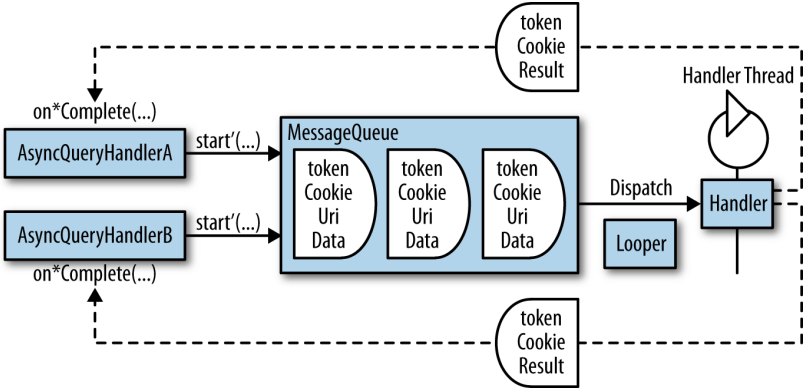
AsyncQueryHandler 的执行

  • 示例
1
2
3
4
5
6
7
8
9
10
11
12
13
14
15
16
17
18
19
20
21
22
23
24
25
26
27
28
29
30
31
32
33
34
35
36
37
38
@Override public void onCreate(Bundle savedInstanceState) {
super.onCreate(savedInstanceState);
mAdapter = new MyExpandableListAdapter(
this,
android.R.layout.simple_expandable_list_item
new String[] { Contacts.DISPLAY_NAME },
new int[] { android.R.id.text1 },
new String[] { Phone.NUMBER },
new int[] { android.R.id.text1 });
setListAdapter(mAdapter);
mQueryHandler = new QueryHandler(this, mAdapter);
mQueryHandler.startQuery(TOKEN_GROUP, // Query for people
null,
Contacts.CONTENT_URI,
CONTACTS_PROJECTION,
Contacts.HAS_PHONE_NUMBER,
null,
Contacts.DISPLAY_NAME + " ASC");
}
private static final class QueryHandler extends AsyncQueryHandler {
private CursorTreeAdapter mAdapter;
public QueryHandler(Context context, CursorTreeAdapter adapter) {
super(context.getContentResolver());
this.mAdapter = adapter;
}
@Override protected void onQueryComplete(int token, Object cookie, Cursor cursor) {
switch (token) {
case TOKEN_GROUP:
mAdapter.setGroupCursor(cursor);
break;
case TOKEN_CHILD:
int groupPosition = (Integer) cookie;
mAdapter.setChildrenCursor(groupPosition, cursor);
break;
}
}
}

使用 CursorLoader

  • 构造器:CursorLoader(Context context, Uri uri, String[] projection, String selection, String[] selectionArgs, String sortOrder)
  • 示例
1
2
3
4
5
6
7
8
9
10
11
12
13
14
15
16
17
18
19
20
21
22
23
24
25
26
27
28
29
30
31
public class ContactActivity extends ListActivity implements LoaderManager.LoaderCallbacks<Cursor>{
private static final int CONTACT_NAME_LOADER_ID = 0;
// Projection that defines just the contact display name
static final String[] CONTACTS_SUMMARY_PROJECTION = new String[] {
ContactsContract.Contacts._ID,
ContactsContract.Contacts.DISPLAY_NAME
};
SimpleCursorAdapter mAdapter;
public void onCreate(Bundle savedInstanceState) {
super.onCreate(savedInstanceState);
initAdapter();
getLoaderManager().initLoader(CONTACT_NAME_LOADER_ID, null, this);
}
private void initAdapter() {
mAdapter = new SimpleCursorAdapter(this,
android.R.layout.simple_list_item_1, null,
new String[] { ContactsContract.Contacts.DISPLAY_NAME },
new int[] { android.R.id.text1}, 0);
setListAdapter(mAdapter);
}
@Override public Loader<Cursor> onCreateLoader(int id, Bundle args) {
return new CursorLoader(this, ContactsContract.Contacts.CONTENT_URI,
CONTACTS_SUMMARY_PROJECTION, null, null, ContactsContract.Contacts.DISPLAY_NAME + " ASC");
}
@Override public void onLoadFinished(Loader<Cursor> loader, Cursor c) {
mAdapter.swapCursor(c);
}
@Override public void onLoaderReset(Loader<Cursor> loader) {
mAdapter.swapCursor(null);
}
}

5. 选择异步技术

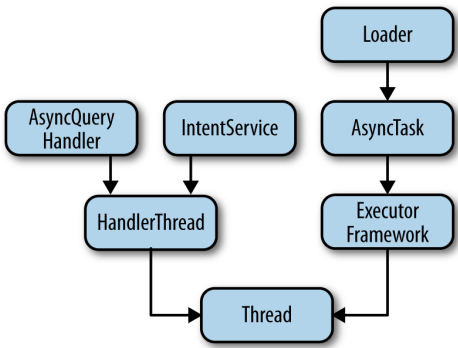
Android 平台异步技术体系