遇见 JenKins - 持续集成(一)

一个程序员(工程师)的工作要是少了持续集成这一环节,他(她)就不能算是程序员。

JenKins 认知

持续开发 -> 持续测试 -> 持续构建 -> 持续部署/交付

JenKins 是什么

  • 持续性构建或测试软件工程
  • 监控外部工作的执行

JenKins 最佳实践

  • 安全性:强制采取认证和权限控制
  • 周期性备份
  • 使用“文件指纹”(file fingerprinting)管理(因交叉工程协作带来的)依赖性
  • 最可靠的构建是清洁构建(clean builds,which are built fully from Source Code Control)
  • 紧密结合问题追踪系统(如 JIRA 或 bugzilla)以减少手工维护变更记录的麻烦
  • 紧密结合源代码浏览工具(如 FishEye),但前提是使用 Subversion 作为源代码版本管理工具
  • 坚持对每一个构建生成趋势报告和进行自动化测试
  • 为 JenKins 分配足够多的磁盘空间
  • 为要移除的构建工作打包仓储
  • 为不同的分支(维护或开发)都单独建立构建工作
  • 为平行构建的工作分配不同的端口,但最好避免同时构建多个工程
  • 使用 Email 功能以保持团队对开发工作的感知
  • 分步式测试计划以保证失败地构建得以尽早上报(比如在整体套件测试之前进行嗅探性测试)
  • 为构建工作制定维护计划,比如定期清理以避免磁盘耗尽
  • 为成功的构建上标签,描述
  • Configure Jenkins bootstrapper to update your working copy prior to running the build goal/target
  • In larger systems, don’t build on the master(do this by setting the executor count to zero)

持续构建的7个阶段

  1. No Build Server
  2. Nightly Builds
  3. Nightly Builds and Basic Automated Tests
  4. Automated code quality and code coverage metrics
  5. Getting More Serious About Testing(TDD are more widely practiced)
  6. Automated Acceptance Tests and More Automated Deployment
  7. Continuous Deployment

安装 JenKins

准备环境

  • 安装 Java
  • 安装 Git 并设置 Git 账号和配置 SSH Key

一个示例

1
$ git clone https://github.com/wakaleo/game-of-life.git

启动

1
2
3
4
5
6
$ java -jar jenkins.war # http://192.168.1.108:8080/
$ java -jar jenkins.war --httpPort=8081
$ java -jar jenkins.war --prefix=jenkins
$ java -jar jenkins.war --logfile=/var/log/jenkins.log
$ wget http://localhost:8080/exit
$ wget --user=admin --password=secret http://localhost:8080/exit

配置

  • Maven
  • JDK
  • 配置插件:Git Plugin、Mail Server

开始第一个构建任务

  • 任务命名:game-of-life-default,并选择”Build a freestyle software project”
  • 选择 Poll SCM :” “ 【 9-17 (在每天从 9am 到 5pm 的任意一分钟内);/5 *(每5分钟);@hourly;@daily;】
  • 构建步骤配置1 :”Invoke top-level Maven targets”,并输入”clean package”;
  • 构建后步骤配置1 :”Publish JUnit test resultreport”,并输入”*/target/surefire-reports/.xml”;
  • 构建后步骤配置2 :”Archive the artifacts””,并输入”*/target/.jar”;
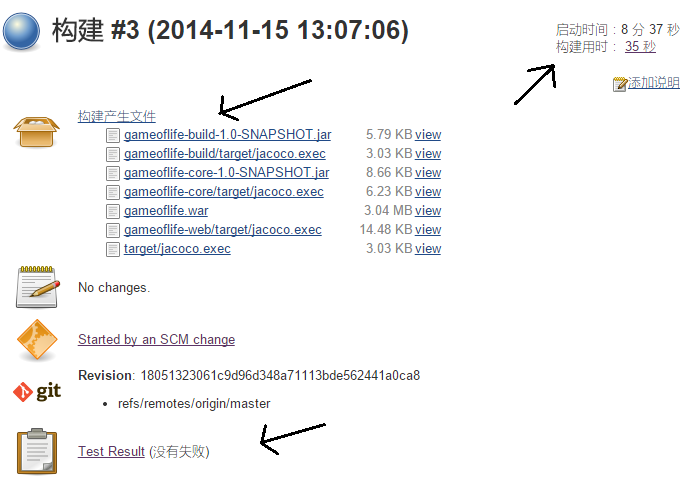
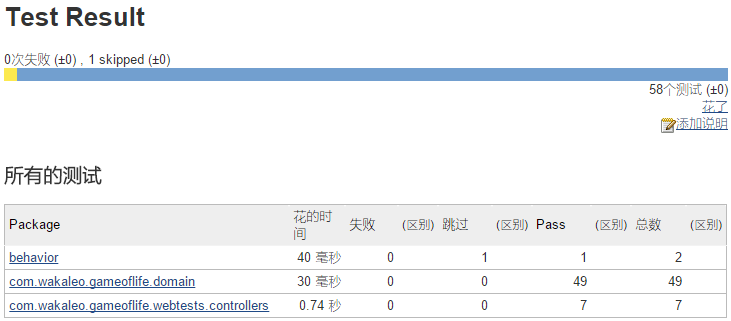
  • 在任务界面选择立即构建,其部分输出和结果如下:
1
2
3
4
5
6
7
8
9
10
11
12
13
14
15
16
17
18
19
20
21
22
23
24
25
26
27
28
29
30
31
32
33
34
35
36
37
38
39
40
41
42
43
-------------------------------------------------------
T E S T S
-------------------------------------------------------
Running com.wakaleo.gameoflife.webtests.controllers.WhenCreatingANewGame
Tests run: 3, Failures: 0, Errors: 0, Skipped: 0, Time elapsed: 0.797 sec
Running com.wakaleo.gameoflife.webtests.controllers.WhenSpawningANewGeneration
Tests run: 2, Failures: 0, Errors: 0, Skipped: 0, Time elapsed: 0.055 sec
Running com.wakaleo.gameoflife.webtests.controllers.WhenDisplayingTheHomePage
Tests run: 2, Failures: 0, Errors: 0, Skipped: 0, Time elapsed: 0 sec
Results :
Tests run: 7, Failures: 0, Errors: 0, Skipped: 0
[INFO]
[INFO] --- maven-easyb-plugin:1.4:test (default) @ gameoflife-web ---
[INFO] /root/.jenkins/workspace/game-of-life-default/gameoflife-web/src/test/stories does not exists. Skipping easyb testing
[INFO]
[INFO] --- maven-war-plugin:2.1.1:war (default-war) @ gameoflife-web ---
[INFO] Packaging webapp
[INFO] Assembling webapp [gameoflife-web] in [/root/.jenkins/workspace/game-of-life-default/gameoflife-web/target/gameoflife]
[INFO] Processing war project
[INFO] Copying webapp resources [/root/.jenkins/workspace/game-of-life-default/gameoflife-web/src/main/webapp]
[INFO] Webapp assembled in [358 msecs]
[INFO] Building war: /root/.jenkins/workspace/game-of-life-default/gameoflife-web/target/gameoflife.war
[INFO] WEB-INF/web.xml already added, skipping
[INFO] ------------------------------------------------------------------------
[INFO] Reactor Summary:
[INFO]
[INFO] gameoflife ........................................ SUCCESS [ 6.258 s]
[INFO] gameoflife-build .................................. SUCCESS [ 2.433 s]
[INFO] gameoflife-core ................................... SUCCESS [ 7.998 s]
[INFO] gameoflife-web .................................... SUCCESS [ 3.462 s]
[INFO] ------------------------------------------------------------------------
[INFO] BUILD SUCCESS
[INFO] ------------------------------------------------------------------------
[INFO] Total time: 21.423 s
[INFO] Finished at: 2014-11-15T13:07:39+08:00
[INFO] Final Memory: 25M/193M
[INFO] ------------------------------------------------------------------------
Archiving artifacts
Recording test results
Finished: SUCCESS


持续集成示例

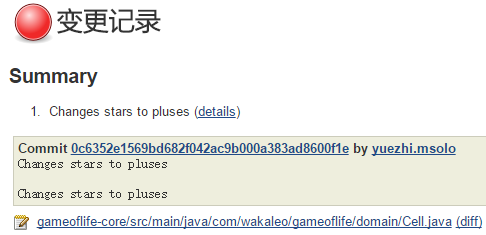
  • 更改文件 game-of-life/gameoflife-core/src/main/java/com/wakaleo/gameoflife/domain/Cell.java
  • $ git commit -a -m “Changes stars to pluses”
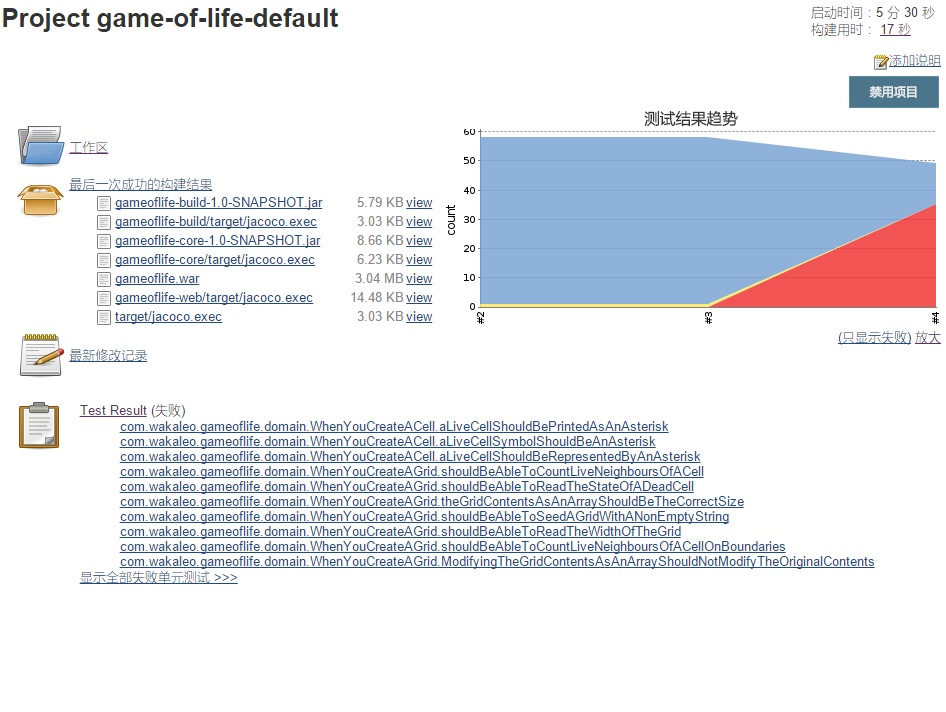
  • 大约一分钟后,依照对任务的配置,这将自动触发构建,其结果如下:

1
2
3
4
5
6
7
8
9
10
11
12
13
14
15
16
17
18
19
20
21
22
23
24
25
26
27
28
29
30
31
32
33
ests run: 49, Failures: 6, Errors: 29, Skipped: 0
[INFO] ------------------------------------------------------------------------
[INFO] Reactor Summary:
[INFO]
[INFO] gameoflife ........................................ SUCCESS [ 1.736 s]
[INFO] gameoflife-build .................................. SUCCESS [ 1.000 s]
[INFO] gameoflife-core ................................... FAILURE [ 2.637 s]
[INFO] gameoflife-web .................................... SKIPPED
[INFO] ------------------------------------------------------------------------
[INFO] BUILD FAILURE
[INFO] ------------------------------------------------------------------------
[INFO] Total time: 5.598 s
[INFO] Finished at: 2014-11-15T13:28:33+08:00
[INFO] Final Memory: 23M/176M
[INFO] ------------------------------------------------------------------------
[ERROR] Failed to execute goal org.apache.maven.plugins:maven-surefire-plugin:2.11:test (unit-tests) on project gameoflife-core: There are test failures.
[ERROR]
[ERROR] Please refer to /root/.jenkins/workspace/game-of-life-default/gameoflife-core/target/surefire-reports for the individual test results.
[ERROR] -> [Help 1]
[ERROR]
[ERROR] To see the full stack trace of the errors, re-run Maven with the -e switch.
[ERROR] Re-run Maven using the -X switch to enable full debug logging.
[ERROR]
[ERROR] For more information about the errors and possible solutions, please read the following articles:
[ERROR] [Help 1] http://cwiki.apache.org/confluence/display/MAVEN/MojoFailureException
[ERROR]
[ERROR] After correcting the problems, you can resume the build with the command
[ERROR] mvn <goals> -rf :gameoflife-core
Build step 'Invoke top-level Maven targets' marked build as failure
Archiving artifacts
Recording test results
Finished: FAILURE


更多报告:显示 JavaDoc 和增加代码覆盖范围等测试

  • 构建步骤配置2 :”Invoke top-level Maven targets”,并输入”javadoc:javadoc -o”;
  • 构建后步骤配置3 :”Publish Javadoc”,并输入”gameoflife-core/target/site/apidocs”;
  • 下载 JenKins 插件:Cobertura(coverage tool)、
  • 构建步骤配置2 :”Invoke top-level Maven targets”,并更新输入”javadoc:javadoc cobertura:cobertura”;
  • 构建后步骤配置4 :”Publish Cobertura coverage Report”,并输入”**/target/site/cobertura/coverage.xml”;

未完待续

参考
书目:《JenKins : The Definitive Guide》
网站:http://jenkins-ci.org/