实践设计模式 :Command 命令者模式

背景

  • 软件:公司有物 App. Android 版
  • 目标:LoginAcitivity
  • 说明:登录使用了友盟第三方组件,因为微信配置等问题,导致上一版本的微信登录功能没有实现;目前只实现了的有:新浪微博、腾讯QQ;
  • 缺点:1. 类过于庞大,导致类的职责包含过多,过杂; 2. SDK老旧,其中微信功能实现有重大更新;
  • 补充:1. 因为所有功能都实现在一个类中,因此牵涉的代码较少,容易重构;

重构与设计模式

  • 架构:抽离系统的登录功能,独立为登录子系统,并使其成为架构第一层级;
  • 设计:使用设计模式的 Command 命令者模式;

实践 Command 模式

  1. Client : LoginActivity, 创建一个具体命令对象(如原生登录,第三方登录【微信,微博 etc.】)并设定它的接收者;
  2. Invoker : LoginAuthInvoker, 要求该命令执行这个请求;
  3. Receiver: SourceLoginAuthCommand, UmengLoginAuthCommand, WeiXinLoginAuthCommand, 知道如何实施与执行一个请求相关的操作。
  4. Service : LoginConn 到公司有物服务器的登录接口;LoginConnManager 管理到公司有物服务器的登录连接;LoginAuthThirdPartyService 服务于第三方登录的一些琐碎操作及创建 LoginConnManager 对象;

Stockeye 持续集成之路 —— NotificationStockQuote 开发实录

关键字 :Jenkins、Gradle、Jacoco、Android Studio、JUnit 和 Robolectri(只适用Android API Level 16、 17、18)

预构

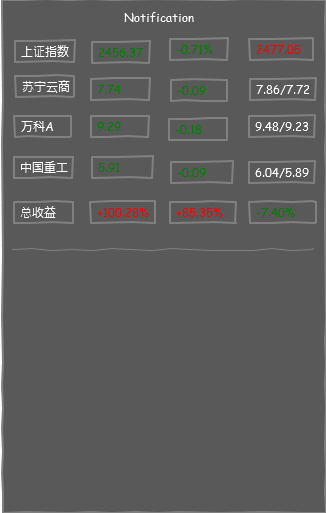
  • 故事点(Agile - Scrum):用户可拉下通知框以查看实时股票信息
  • 界面草图(见下图)
  • 软件设计模式 :观察者模式(Notification 为观察者,数据更新服务为目标,可能有多个不同类型观察者,考虑引进中介者模式以减轻服务管理依赖负担)
  • 类:NotificationStockQuote,接口 -> IObserverNotificationStockQuote,数据结构 -> 二维数组(界面布局采取Listview)

项目概览

项目 build.gradle

1
2
3
4
5
6
7
8
9
10
11
12
13
14
buildscript {
repositories {
jcenter()
}
dependencies {
classpath 'com.android.tools.build:gradle:0.13.2'
classpath 'org.robolectric:robolectric-gradle-plugin:0.13.+'
}
}
allprojects {
repositories {
jcenter()
}
}

app. build.gradle

more >>

Android 面试题记录 (三)

1. 关于 Service 的一些细节

  • Service 的种类:Started Service 和 Bound Service,分别对应于 Context.startService(Intent) 和 Context.bindService;
  • 如果一个 Service 在 onStartCommand 执行的过程中被终止,则已提交的 Intent 将得不到机会启动,该 Intent 仍会被视为一个挂起的请求,而非一个已启动的请求(started request);
1
2
3
4
5
6
7
8
9
10
11
12
13
14
15
16
17
// Started Service
public class StartedEatService extends Service {
@Override public int onStartCommand(Intent intent, int flags, int startId) { ... }
@Override public IBinder onBind(Intent intent) { return null; }
}
// return value of onStartCommand:
// 1. START_STICKY,Service 将以新进程的形式予以重新启动而不管是否有任何挂起的请求,
// 被终止的请求将不会重新提交,如果有挂起的请求,flags 值将被设置为 START_FLAG_RETRY,
// 如果没有任何挂起的请求,重新启动后,onStartCommand 的 Intent 值为 null;
// 2. START_NOT_STICKY,与上一个 flag 相同,但有一个区别是,Service 只在有挂起的请求时才重新启动;
// 3. START_REDELIVER_INTENT,将为那些挂起的请求或正在执行的而没有完成的请求重新启动,
// 其中挂起的请求,flags 值将设置为START_FLAG_RETRY,而未完成的请求则为 START_FLAG_REDELIVERY;
//
public class BoundService extends Service {
@Override public IBinder onBind(Intent intent) { /* Return communication interface */ }
@Override public boolean onUnbind(Intent intent) { /* Last component has unbound */ }
}

Local Binding

more >>

Android 面试题记录(二)

1. 管理基本线程的生命期

生命期 :New -> Runnable -> Blocked/Waiting(Thread.sleep() | Thread.yield()) -> Terminated

Uncaught Exceptions

  • Thread global handler:static void setDefaultUncaughtExceptionHandler(Thread.UncaughtExceptionHandler handler);
  • Thread local handler:void setUncaughtExceptionHandler(Thread.UncaughtExceptionHandler handler);
  • Unhandled Exceptions on the UI Thread,参见面试题记录(一)
1
2
3
4
5
6
7
8
9
10
11
12
Thread t = new Thread(new Runnable() {
@Override public void run() {
throw new RuntimeException("Unexpected error occurred");
}
});
t.setUncaughtExceptionHandler(new Thread.UncaughtExceptionHandler() {
@Override public void uncaughtException(Thread thread, Throwable throwable) {
// A basic logging of the message. Could be replaced by log to file or a network post.
Log.d(TAG, throwable.toString());
}
});
t.start();

在 Activity 中保持线程

  • public Object onRetainNonConfigurationInstance():Called by the platform before a configuration change occurs, the implementation should return any object that you want to be retained across a configuration change (e.g., a thread) and passed to the new Activity object.
  • public Object getLastNonConfigurationInstance():Called by the platform before a configuration change occurs, it can be called in onCreate or onStart and returns null if the Activity is started for another reason than a configuration change.

more >>

Android 面试题纪录(一)

目录

  1. JVM和DVM的不同
  2. Android如何启动一个应用
  3. UI Thread 如何工作
  4. UI Thread 消息机制 API 概览
  5. 阐述 MessageQueue.IdleHandler
  6. Android 平台如何调度线程
  7. Android下线程有哪些通信方式
  8. 进程间如何通信
  9. Android 如何管理内存


1. JVM和DVM的不同

  • JVM is a stack-based machine; while DVM is register-based(执行相同任务比JVM使用更少的指令);
  • A stack-based virtual machine must transfer data from registers to the operand stack before manipulating them. In contrast, a register-based VM operates by directly using virtual registers. This increases the relative size of instructions because they must specify which registers to use, but reduces the number of instructions that must be executed to achieve the same result.

2. Android如何启动一个应用

Zygote启动应用流程

  • Android启动时将率先运行一个独特的进程Zygote。而Zygote将启动一虚拟机,该虚拟机将预先加载Android核心库并初始化各种共享资源体,最后它将使用套接字进行监听。
  • 当用户启动一个Android应用时,Zygote将创建一个虚拟机(通过写时复制(Copy-On-Write)的技术拷贝Zygote虚拟机)以便其运行,并以子进程的身份和其父进程共享内存。

more >>

Android 语音开发(无交互)

ANDROID SDK TTS Package Summary


Starting the TTS engine

1
2
3
4
5
6
TextToSpeech tts = new TextToSpeech(this, new OnInitListener() {
public void onInit(int status){
if (status == TextToSpeech.SUCCESS)
speak("Hello world", TextToSpeech.QUEUE_ADD, null);
}
}
  • QUEUE_ADD: The new entry placed at the end of the playback queue.
  • QUEUE_FLUSH: All entries in the playback queue are dropped and replaced by the new entry.

1
2
3
4
5
6
7
8
9
10
11
12
13
14
15
16
17
18
19
20
21
22
23
24
25
26
27
28
29
30
31
32
33
34
35
36
37
38
39
40
41
42
43
private void initTTS() {
disableSpeakButton(); //Disable speak button during the initialization of the text to speech engine
//Check if a the engine is installed, when the check is finished, the onActivityResult method is executed
Intent checkIntent = new Intent(TextToSpeech.Engine.ACTION_CHECK_TTS_DATA);
startActivityForResult(checkIntent, TTS_DATA_CHECK);
}
/**
* Callback from check for text to speech engine installed
* If positive, then creates a new <code>TextToSpeech</code> instance which will be called when user clicks on the 'Speak' button
* If negative, creates an intent to install a <code>TextToSpeech</code> engine
*/
@Override
protected void onActivityResult(int requestCode, int resultCode, Intent data) {
if (requestCode == TTS_DATA_CHECK) {
// Check that the resultCode is CHECK_VOICE_DATA_PASS, it was the TTS which result is being processed and not any other activity
if (resultCode == TextToSpeech.Engine.CHECK_VOICE_DATA_PASS) {
tts = new TextToSpeech(this, new OnInitListener() { // Create a TextToSpeech instance
public void onInit(int status) {
if ( (status == TextToSpeech.SUCCESS) && (tts.isLanguageAvailable(Locale.US) >= 0) ) {
tts.setLanguage(Locale.US);
}
enableSpeakButton();
}
});
} else { // Install missing data
PackageManager pm = getPackageManager();
Intent installIntent = new Intent();
installIntent.setAction(TextToSpeech.Engine.ACTION_INSTALL_TTS_DATA);
ResolveInfo resolveInfo = pm.resolveActivity( installIntent, PackageManager.MATCH_DEFAULT_ONLY );
if( resolveInfo == null ) {
Toast.makeText(TTSWithIntent.this,
"There is no TTS installed, please download it from Google Play",
Toast.LENGTH_LONG).show();
} else {
startActivity( installIntent );
}
}
}
}

more >>