实践设计模式 :Command 命令者模式

背景

  • 软件:公司有物 App. Android 版
  • 目标:LoginAcitivity
  • 说明:登录使用了友盟第三方组件,因为微信配置等问题,导致上一版本的微信登录功能没有实现;目前只实现了的有:新浪微博、腾讯QQ;
  • 缺点:1. 类过于庞大,导致类的职责包含过多,过杂; 2. SDK老旧,其中微信功能实现有重大更新;
  • 补充:1. 因为所有功能都实现在一个类中,因此牵涉的代码较少,容易重构;

重构与设计模式

  • 架构:抽离系统的登录功能,独立为登录子系统,并使其成为架构第一层级;
  • 设计:使用设计模式的 Command 命令者模式;

实践 Command 模式

  1. Client : LoginActivity, 创建一个具体命令对象(如原生登录,第三方登录【微信,微博 etc.】)并设定它的接收者;
  2. Invoker : LoginAuthInvoker, 要求该命令执行这个请求;
  3. Receiver: SourceLoginAuthCommand, UmengLoginAuthCommand, WeiXinLoginAuthCommand, 知道如何实施与执行一个请求相关的操作。
  4. Service : LoginConn 到公司有物服务器的登录接口;LoginConnManager 管理到公司有物服务器的登录连接;LoginAuthThirdPartyService 服务于第三方登录的一些琐碎操作及创建 LoginConnManager 对象;

Stockeye 持续集成之路 —— NotificationStockQuote 开发实录

关键字 :Jenkins、Gradle、Jacoco、Android Studio、JUnit 和 Robolectri(只适用Android API Level 16、 17、18)

预构

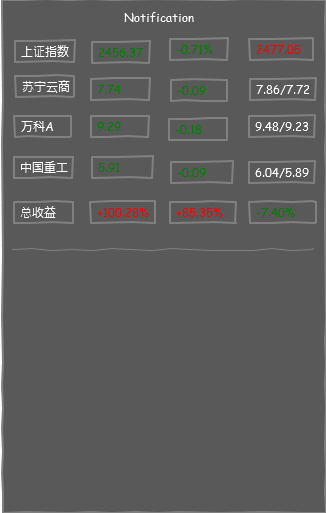
  • 故事点(Agile - Scrum):用户可拉下通知框以查看实时股票信息
  • 界面草图(见下图)
  • 软件设计模式 :观察者模式(Notification 为观察者,数据更新服务为目标,可能有多个不同类型观察者,考虑引进中介者模式以减轻服务管理依赖负担)
  • 类:NotificationStockQuote,接口 -> IObserverNotificationStockQuote,数据结构 -> 二维数组(界面布局采取Listview)

项目概览

项目 build.gradle

1
2
3
4
5
6
7
8
9
10
11
12
13
14
buildscript {
repositories {
jcenter()
}
dependencies {
classpath 'com.android.tools.build:gradle:0.13.2'
classpath 'org.robolectric:robolectric-gradle-plugin:0.13.+'
}
}
allprojects {
repositories {
jcenter()
}
}

app. build.gradle

more >>

探索 C++ (一)

参考书籍:
《Professional C++》、《C++ in Action》、《C++ 代码设计与重用》
《C++ 标准库》、《深度探索 C++ 对象模型》
《Modern C++ Programming with Test-Driven Development》、《Effective Modern C++》

程序之母

面向过程

1
2
3
4
5
6
#include <iostream>
int main()
{
std::cout << "Hello World!" << std::endl;
return 0;
}

面向对象

1
2
3
4
5
6
7
8
9
#include <iostream>
class HelloWorld
{
public:
HelloWorld() { std::cout << "Hello "; }
~HelloWorld() { std:cout << "World!\n"; }
}
HelloWorld helloWorld;
int main() { }

more >>

持续集成之路 —— Stockeye CalendarStock 库开发实录

关键字 :Jenkins、Gradle、JUnit、Jacoco、jar 包和库、TDD

库项目结构

1
2
3
4
5
6
| build.gradle
| src
| |- main
| |- java/com/msolo/stockeye/calendarstock/UtilCalTime.java
| |- test
| |- java/com/msolo/stockeye/calendarstock/UtilCalTimeTest.java

构建脚本(无 Jacoco)

1
2
3
4
5
6
7
8
9
10
11
apply plugin: 'java'
version = 0.1
repositories {
mavenCentral()
}
dependencies {
testCompile 'junit:junit:4.11'
}
task libJavadocs(type: Javadoc) {
source = sourceSets.main.allJava
}

Jenkins 项目配置(无 JaCoCo)

  • 项目名称:android_stockeye_cal_lib
  • 源码管理:https://github.com/mSoloMoon/android_stockeye_calendar_lib.git
  • 构建触发器:Poll SCM -> *
  • 构建步骤1:Invoke Gradle script -> Switch -> clean build javadoc
  • 构建后操作1:Publish JUnit test result report -> XML -> */build/test-results/.xml
  • 构建后操作2:Publish Javadoc -> build/docs/javadoc/

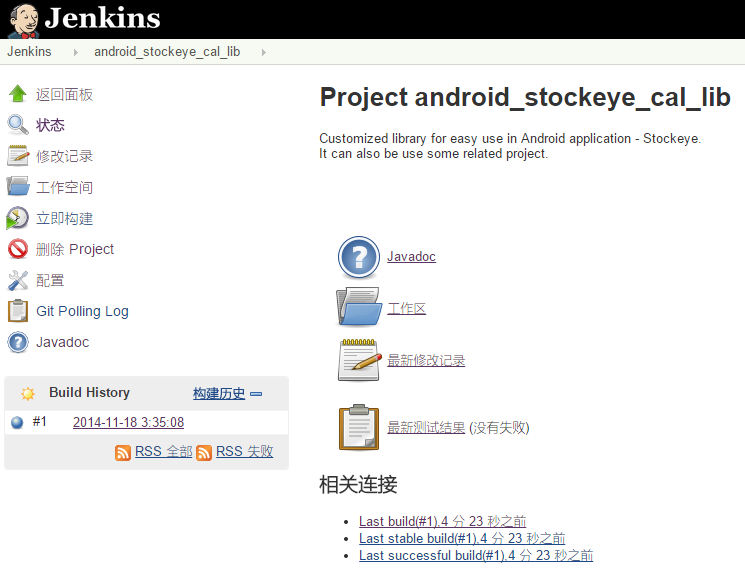
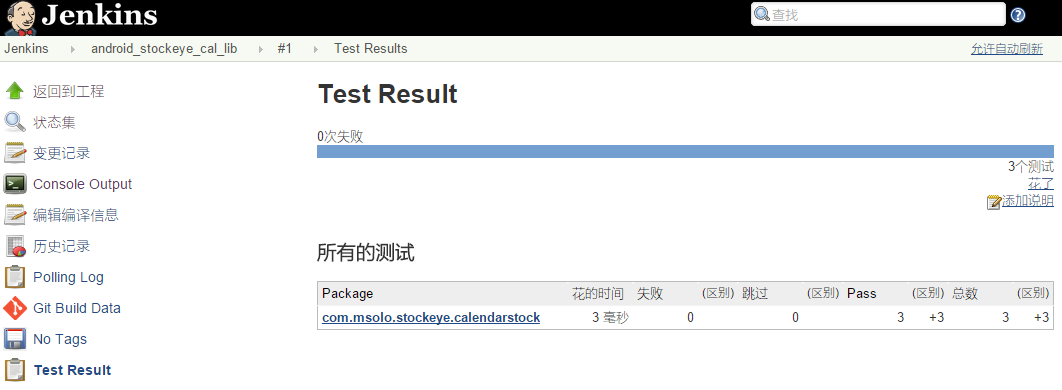
持续集成(无 JaCoCo)

项目首页
测试结果总结

more >>

学习 Gradle —— Java 下一代构建工具(二)

Gradle 构建生命期
初始化阶段(initialization phase):创建 Project 实例 ->
配置阶段(configuration phase):constructs a model representation of the tasks ->
执行阶段(execution phase)

Gradle 构建脚本精要

Gradle 构建的原理 -> 基于 DDD(domain-driven design)进行建模。

构建模块

  • 模块:项目(the Project interface)
1
2
3
4
5
6
7
8
9
10
11
12
13
14
15
16
17
18
19
20
21
22
23
24
25
26
27
28
29
30
31
32
33
34
// Build script configuration
apply(options: Map<String,?>)
buildscript(config: Closure)
//
// Dependency management
dependencies(config: Closure)
configurations(config: Closure)
getDependencies()
getConfigurations()
//
// Properties
getAnt()
getName()
getDescription()
getGroup()
getPath()
getVersion()
getLogger()
setDescription(description: String)
setVersion(version: Object)
//
// File creation
le(path: Object)
les(paths: Object...)
leTree(baseDir: Object)
//
// Task creation
task(args: Map<String,?>, name: String)
task(args: Map<String,?>, name: String, c: Closure)
task(name: String)
task(name: String, c: Closure)
// 示例
setDescription("myProject")
println "Description of project $name: " + project.description

more >>

学习 Git(一)—— Pro Git 2nd

起步

Git 认知

  • Snapshots, Not Diff erences
  • Nearly Every Operation Is Local
  • Everything in Git is check-summed before it is stored and is then referred to by that checksum
  • Git Generally Only Adds Data
  • The Three States :the Git directory, working directory, and the staging area
  • Git 基本工作流程 :增删改(working directory)-> 存储快照(staging area)-> 提交(Git directory)
  • Git 文件状态 :untracked、unmodified、modified、staged

配置 Git

/etc/gitconfig :every user,$ git config —system
~/.gitconfig or ~/.config/git/config :specified user, $ git config —global
.git/config :specified repository, $ git config

1
2
3
4
$ git config --global user.name "John Doe"
$ git config --global user.email johndoe@example.com
$ git config --global core.editor emacs # 默认 vim
$ git config --list # $ git config user.name

实战(一)

  • 新项目
1
2
3
4
5
$ git init # 在某个项目目录里初始化一个 Git working directory -> .git 目录
$ git add *.c # 存储快照(staging area)
$ git commit -m 'initial project version' # 提交
$ git remote add origin https://github.com/username/example.git
$ git push -u origin master

more >>

学习 Gradle —— Java 下一代构建工具(一)

高效软件工程的核心:自动化
自动化构建类型及其进化史:请求式构建 -> 触发式构建 -> 计划式构建
自动化构建工具要素 :任务(DAG - Directed Acyclic Graph,即一段可工作的构件单元 + 依赖)、依赖管理

Gradle 箴言

  • 让不可行变得可行,让可行变得易行,让易行变得简洁
  • Maven VS Gradle
1
2
3
4
5
6
7
8
9
10
11
12
13
14
15
16
17
18
<project xmlns="http://maven.apache.org/POM/4.0.0"
xmlns:xsi="http://www.w3.org/2001/XMLSchema-instance"
xsi:schemaLocation="http://maven.apache.org/POM/4.0.0
http://maven.apache.org/xsd/maven-4.0.0.xsd">
<modelVersion>4.0.0</modelVersion>
<groupId>com.mycompany.app</groupId>
<artifactId>my-app</artifactId>
<packaging>jar</packaging>
<version>1.0-SNAPSHOT</version>
<dependencies>
<dependency>
<groupId>junit</groupId>
<artifactId>junit</artifactId>
<version>4.11</version>
<scope>test</scope>
</dependency>
</dependencies>
</project>
1
2
3
4
5
6
7
8
9
10
apply plugin: 'java'
group = 'com.mycompany.app'
archivesBaseName = 'my-app'
version = '1.0-SNAPSHOT'
repositories {
mavenCentral()
}
dependencies {
testCompile 'junit:junit:4.11'
}

more >>

遇见 JenKins - 持续集成(一)

一个程序员(工程师)的工作要是少了持续集成这一环节,他(她)就不能算是程序员。

JenKins 认知

持续开发 -> 持续测试 -> 持续构建 -> 持续部署/交付

JenKins 是什么

  • 持续性构建或测试软件工程
  • 监控外部工作的执行

JenKins 最佳实践

  • 安全性:强制采取认证和权限控制
  • 周期性备份
  • 使用“文件指纹”(file fingerprinting)管理(因交叉工程协作带来的)依赖性
  • 最可靠的构建是清洁构建(clean builds,which are built fully from Source Code Control)
  • 紧密结合问题追踪系统(如 JIRA 或 bugzilla)以减少手工维护变更记录的麻烦
  • 紧密结合源代码浏览工具(如 FishEye),但前提是使用 Subversion 作为源代码版本管理工具
  • 坚持对每一个构建生成趋势报告和进行自动化测试
  • 为 JenKins 分配足够多的磁盘空间
  • 为要移除的构建工作打包仓储
  • 为不同的分支(维护或开发)都单独建立构建工作
  • 为平行构建的工作分配不同的端口,但最好避免同时构建多个工程
  • 使用 Email 功能以保持团队对开发工作的感知
  • 分步式测试计划以保证失败地构建得以尽早上报(比如在整体套件测试之前进行嗅探性测试)
  • 为构建工作制定维护计划,比如定期清理以避免磁盘耗尽
  • 为成功的构建上标签,描述
  • Configure Jenkins bootstrapper to update your working copy prior to running the build goal/target
  • In larger systems, don’t build on the master(do this by setting the executor count to zero)

more >>

Udacity公开课:软件调试(优酷旁听)

Udacity公开课:CS259软件调试

课程概览

目标
如何系统化的调试
使用自动化调试工具
使用一系列试验,进行程序科学调试假设验证

大纲

  1. 调试如何工作?
  2. 断言实验
  3. delta 自动化调试方法
  4. 程序 bug 如何产生
  5. 重复错误如何发生,统计调试错误源
  6. 信息挖掘 :bug 数据库和变更数据库

第一节

序言:深夜调试

  • 程序员手工调试的弊端:注意力有限,不集中;花费更多时间以致减少了和陪伴家人的时间;
  • 软件工作量占比:测试和调试经常在 50% ~ 75%
  • 调试的困难:无法估计

启程

  • 处理 HTML 输出文本(tag 模式与有限状态机);
  • 简单例子foo:两种状态(tag、text);
  • 第一个漏洞,foo:三种状态(tag、text 和 quote)
  • 第二个漏洞,”foo“;
  • 任意输出变量值调试:时间杀手!任意变更代码调试:混乱杀手!
  • 《代码大全》- 历史:魔鬼调试指南;
  • 修复调试;糊弄单元调试案例;
  • 程序变量的状态 -> defect 感染点 -> 感染点传染 -> 错误;引发感染的情形 -> 调试/测试的 cases
  • 解决:科学假设 -> 预测 -> 试验 -> 渐进式改进假设 —> 理论
  • 假设I:简单测试,输入”foo” -> “bar” -> “”;(因果链)

进度:Udacity公开课:CS259软件调试:01-29 你好断言

未完待续

Android 面试题记录 (三)

1. 关于 Service 的一些细节

  • Service 的种类:Started Service 和 Bound Service,分别对应于 Context.startService(Intent) 和 Context.bindService;
  • 如果一个 Service 在 onStartCommand 执行的过程中被终止,则已提交的 Intent 将得不到机会启动,该 Intent 仍会被视为一个挂起的请求,而非一个已启动的请求(started request);
1
2
3
4
5
6
7
8
9
10
11
12
13
14
15
16
17
// Started Service
public class StartedEatService extends Service {
@Override public int onStartCommand(Intent intent, int flags, int startId) { ... }
@Override public IBinder onBind(Intent intent) { return null; }
}
// return value of onStartCommand:
// 1. START_STICKY,Service 将以新进程的形式予以重新启动而不管是否有任何挂起的请求,
// 被终止的请求将不会重新提交,如果有挂起的请求,flags 值将被设置为 START_FLAG_RETRY,
// 如果没有任何挂起的请求,重新启动后,onStartCommand 的 Intent 值为 null;
// 2. START_NOT_STICKY,与上一个 flag 相同,但有一个区别是,Service 只在有挂起的请求时才重新启动;
// 3. START_REDELIVER_INTENT,将为那些挂起的请求或正在执行的而没有完成的请求重新启动,
// 其中挂起的请求,flags 值将设置为START_FLAG_RETRY,而未完成的请求则为 START_FLAG_REDELIVERY;
//
public class BoundService extends Service {
@Override public IBinder onBind(Intent intent) { /* Return communication interface */ }
@Override public boolean onUnbind(Intent intent) { /* Last component has unbound */ }
}

Local Binding

more >>