Android 面试题记录(二)

1. 管理基本线程的生命期

生命期 :New -> Runnable -> Blocked/Waiting(Thread.sleep() | Thread.yield()) -> Terminated

Uncaught Exceptions

  • Thread global handler:static void setDefaultUncaughtExceptionHandler(Thread.UncaughtExceptionHandler handler);
  • Thread local handler:void setUncaughtExceptionHandler(Thread.UncaughtExceptionHandler handler);
  • Unhandled Exceptions on the UI Thread,参见面试题记录(一)
1
2
3
4
5
6
7
8
9
10
11
12
Thread t = new Thread(new Runnable() {
@Override public void run() {
throw new RuntimeException("Unexpected error occurred");
}
});
t.setUncaughtExceptionHandler(new Thread.UncaughtExceptionHandler() {
@Override public void uncaughtException(Thread thread, Throwable throwable) {
// A basic logging of the message. Could be replaced by log to file or a network post.
Log.d(TAG, throwable.toString());
}
});
t.start();

在 Activity 中保持线程

  • public Object onRetainNonConfigurationInstance():Called by the platform before a configuration change occurs, the implementation should return any object that you want to be retained across a configuration change (e.g., a thread) and passed to the new Activity object.
  • public Object getLastNonConfigurationInstance():Called by the platform before a configuration change occurs, it can be called in onCreate or onStart and returns null if the Activity is started for another reason than a configuration change.

more >>

程序员的自我修养 - 从Hello World!说起

计算机科学领域的任何问题都可以通过增加一个间接的中间层来解决。

背景知识

  • 不要让CPU打盹:分时多任务、进程、抢占式分配CPU;
  • 磁盘:扇区、LBS(逻辑扇区号)、文件系统;
  • 内存不够怎么办:1. 分段(解决地址空间不隔离);2. 分页【页大小、虚拟页/物理页、页错误和MMU(虚拟地址到物理地址的转换)】(解决使用效率低);
  • 线程:一个进程由一个或多个线程组成;一个标准的线程由线程ID、当前指令指针(PC)、寄存器集合和堆栈组成;状态(就绪、运行、等待);Linux的多线程(fork、exec和clone、写时复制);
  • 线程安全:竞争与原子操作、同步与锁(二元信号量和信号量【即多元信号量】、互斥量和临界区、读写锁、条件变量);可重入;
  • volatile:阻止编译器为了提高速度将一个变量缓存到寄存器内而不写回;
  • 对象构造(pInst = new PInst())包含三个顺序的步骤:1. 分配内存;2. 在内存的位置上调用构造函数;3. 将内存的地址赋值给pInst;【在上述三个步骤中,CPU完全有可能动态调整2和3的执行顺序!】
  • 线程并发模型:1. 一对一模型;2. 多对一模型(将多个用户线程映射到一个内核线程上);3. 多对多模型;

Hello World 程序构建

1
2
3
4
5
6
#include <stdio.h>
int main()
{
printf("Hello World!");
return 0;
}

初级:

  1. 预处理: $ gcc -E hello.c -o hello.i 或 $ cpp hello.c > hello.i
  2. 编译: $ gcc -S hello.i -o hello.s(现在版本的 GCC 把预处理和编译两个步骤合并成一个步骤,使用一个cc1的程序。)
  3. 汇编:$ as hello.s -o hello.o 或 $ gcc -c hello.s -o hello.o(根据汇编指令和机器指令的对照表一一翻译即可。)
  4. 链接:$ ld -static /usr/lib/crt1.o /usr/lib/crti.o /usr/lib/gcc/i486-linux-gnu/4.1.3/crtbeginT.o -L/usr/lib/gcc/1486-linux-gnu/4.1.3 -L/usr/lib -L/lib hello.o —start-group -lgcc -lgcc_eh -lc —end-group /usr/lib/gcc/i486-linux-gnu/4.1.3/crtend.o /usr/lib/crtn.o

more >>

Android 面试题纪录(一)

目录

  1. JVM和DVM的不同
  2. Android如何启动一个应用
  3. UI Thread 如何工作
  4. UI Thread 消息机制 API 概览
  5. 阐述 MessageQueue.IdleHandler
  6. Android 平台如何调度线程
  7. Android下线程有哪些通信方式
  8. 进程间如何通信
  9. Android 如何管理内存


1. JVM和DVM的不同

  • JVM is a stack-based machine; while DVM is register-based(执行相同任务比JVM使用更少的指令);
  • A stack-based virtual machine must transfer data from registers to the operand stack before manipulating them. In contrast, a register-based VM operates by directly using virtual registers. This increases the relative size of instructions because they must specify which registers to use, but reduces the number of instructions that must be executed to achieve the same result.

2. Android如何启动一个应用

Zygote启动应用流程

  • Android启动时将率先运行一个独特的进程Zygote。而Zygote将启动一虚拟机,该虚拟机将预先加载Android核心库并初始化各种共享资源体,最后它将使用套接字进行监听。
  • 当用户启动一个Android应用时,Zygote将创建一个虚拟机(通过写时复制(Copy-On-Write)的技术拷贝Zygote虚拟机)以便其运行,并以子进程的身份和其父进程共享内存。

more >>

Stockeye项目 - CalendarStock包(初步设计)

预构

1
2
3
4
5
6
7
8
9
10
11
12
13
14
15
16
17
// class UtilCalTime
public int getIntCal();
public String getStrCal();
public String getCalFormat();
public String getTimeHHMMSS();
public String getTimeFormat();
public String getLatestDayOfStock();
public String[] getWorkdayArrayUtilNow();
public int getIntWeekday();
public String getWeekday();
public int getCountByTenSecond();
public boolean checkIsWorkday();
public String convertIntToCalFormat();
public int convertStrCalToInt();
public int getQuarterByMonth();
public int getWeekIndexOfYear();
public int getDateIndexOfYear();

more >>

拜读Bruce大作 —— 《Java编程思想》(第一遍)

Java编程思想


所有优秀的作者,包括那些编写软件的程序员,都清楚其著作的某些部分直至重新创作的时候才变得完美,有时甚至要反复重写多次

第一章 对象导论

对象是一个通过对问题域(即上下文)中的元素进行建模,是一个其封装了以数据成员或属性表示的内部状态和以成员方法与接口表示的行为的抽象概念

  1. 对象始于抽象 -> 抽象始于问题建模【问题域即上下文】;
  2. 每个对象都有一个接口,接口体现服务,每个对象都提供服务,将对象看作“服务的提供者”有助于提高对象的内聚性;
  3. 使用面向对象的好处:便于对问题进行表示和交流;可应用设计良好的继承机制;拥有比如多态(可替代性(substitutability):某一特定类型的所有对象都可以接收同样的消息)等高级开发技巧;
  • 继承关系探讨,“是一个” 与 “像是一个”,【书:有时必须在导出类型中添加新的接口元素,这个新的类型仍然可以替代基类,但是这种替代并不完美,因为基类无法访问新添加的方法。这种情况我们可以描述为is-like-a关系。】
  • 多态的可互换对象,【书:为了执行动态绑定,Java使用一小段特殊代码来替代绝对地址调用;它忽略类型的具体细节,仅仅和基类交互。这段代码和具体类型信息是分离的…把将导出类看做是它的基类的过程称为向上转型(upcasting)…这里要表达的是,如果你是一个Shape,我知道你可以 erase() 和 draw() 你自己,那么去做吧…】
  • 单根继承结构的好处:1.简化参数传递,保证所有对象都具有某些功能,执行基本操作;2.使得垃圾回收器的实现变得容易多;3.为异常处理等系统级操作带来灵活性;
  • 异常处理:异常是一种对象;有助于编写出更健壮程序的机制;

第二章 一切都是对象

一切都是引用,引用操纵对象;
对象存储到什么地方:new 对象存储在堆(寄存器、堆栈、堆、常量存储区、非RAM存储区[流对象和持久化对象-即磁盘等]);
基本类型存储到什么地方:变量直接存储“值”,并置于堆栈中,更加高效;
java中的数组,【书:当创建一个数组对象时,实际上就是创建一个引用数组。并且每个引用都会被初始化为一个特定值,该值拥有自己的关键字null】;

  • 永远不需要销毁对象?!
  • static 关键字:static 方法可以创建或使用与其类型相同的被命名对象;因此常常拿来做“牧羊人”的角色,负责看护与其隶属统一类型的实例群;

more >>

Java 面试题 - Stack and Queue

ArrayDeque

  • Resizable-array implementation of the Deque interface.
  • 此类很可能在用作堆栈时快于 Stack,在用作队列时快于 LinkedList。大多数 ArrayDeque 操作以摊销的固定时间运行。

JAVA中Stack和Heap的区别

  • 每个应用程序运行时,都有属于自己的一段内存空间,用于存放临时变量、参数传递、函数调用时的PC值的保存。这叫stack。
  • 所有的应用可以从一个系统共用的空间中申请供自己使用的内存,这个共用的空间叫heap。
  • Java中对象都是分配在heap(堆)中。从heap中分配内存所消耗的时间远远大于从stack产生存储空间所需的时间。
  • 要使用heap中申请的变量或对象只能定义变量指针,并要求在运行过程中通过new来动态分配内存空间,而且必须显示地free你申请过的内存,不过Java的垃圾回收机解决了这个问题,它会帮你释放这部分内存。
  • 另外,栈有一个很重要的特殊性,就是存在栈中的数据可以共享。int a=3; int b=3; 创建 a 变量后,由于在栈中已经有3这个字面值,于是 b 直接指向3的地址。在编译器内部,遇到 a=4;时,它就会重新搜索栈中是否有4的字面值,如果没有,重新开辟地址存放4的值;如果已经有了,则直接将a指向这个地址。因此a值的改变不会影响到b的值。
  • 像String str = “abc”;这种场合下,其字符串值是保存了一个指向存在栈中数据的引用;

面试题补充

1、 Describe how you could use a single array to implement three stacks

1
2
3
4
5
6
7
8
9
10
11
12
13
14
15
16
17
18
19
20
21
22
23
24
int stackSize = 300;
int[] buffer = new int [stackSize * 3];
int[] stackPointer = {0, 0, 0}; // stack pointers to track top elem
void push(int stackNum, int value) {
/* Find the index of the top element in the array + 1, and
* increment the stack pointer */
int index = stackNum * stackSize + stackPointer[stackNum] + 1;
stackPointer[stackNum]++;
buffer[index] = value;
}
int pop(int stackNum) {
int index = stackNum * stackSize + stackPointer[stackNum];
stackPointer[stackNum]--;
int value = buffer[index];
buffer[index]=0;
return value;
}
int peek(int stackNum) {
int index = stackNum * stackSize + stackPointer[stackNum];
return buffer[index];
}
boolean isEmpty(int stackNum) {
return stackPointer[stackNum] == stackNum*stackSize;
}

more >>

Java 面试题 - Arrays and Strings

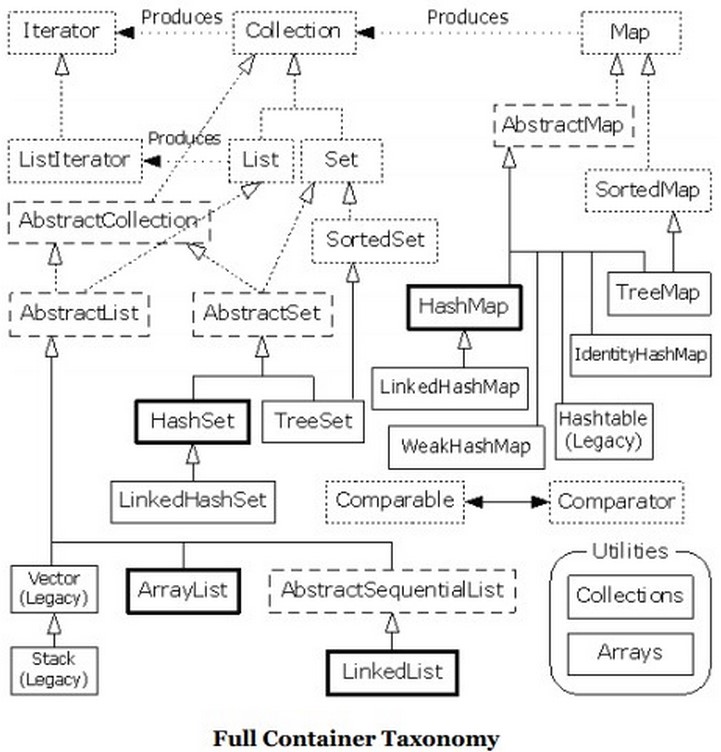
Java容器类库图


HashMap和Hashtable

  • HashMap不是线程安全的,由于非线程安全,效率上可能高于Hashtable;
  • Hastmap是Java 1.2引进的Map interface的一个实现;其中键和值都是对象,可以包含重复值。HashMap允许null key和null value,而hashtable不允许;
  • 为一个HashMap提供外同步。其中一个方法就是利用Collections类的静态的synchronizedMap(),它创建一个线程安全的Map对象,并返回一个封装的对象。这个对象的方法可以让你同步访问潜在的HashMap;
  • HashMap去掉了HashTable的contains方法,但加上了containsValue()和containsKey()方法;
  • HashTable是线程安全的一个Collection,继承自陈旧的Dictionary类;

more >>

Android 语音开发(无交互)

ANDROID SDK TTS Package Summary


Starting the TTS engine

1
2
3
4
5
6
TextToSpeech tts = new TextToSpeech(this, new OnInitListener() {
public void onInit(int status){
if (status == TextToSpeech.SUCCESS)
speak("Hello world", TextToSpeech.QUEUE_ADD, null);
}
}
  • QUEUE_ADD: The new entry placed at the end of the playback queue.
  • QUEUE_FLUSH: All entries in the playback queue are dropped and replaced by the new entry.

1
2
3
4
5
6
7
8
9
10
11
12
13
14
15
16
17
18
19
20
21
22
23
24
25
26
27
28
29
30
31
32
33
34
35
36
37
38
39
40
41
42
43
private void initTTS() {
disableSpeakButton(); //Disable speak button during the initialization of the text to speech engine
//Check if a the engine is installed, when the check is finished, the onActivityResult method is executed
Intent checkIntent = new Intent(TextToSpeech.Engine.ACTION_CHECK_TTS_DATA);
startActivityForResult(checkIntent, TTS_DATA_CHECK);
}
/**
* Callback from check for text to speech engine installed
* If positive, then creates a new <code>TextToSpeech</code> instance which will be called when user clicks on the 'Speak' button
* If negative, creates an intent to install a <code>TextToSpeech</code> engine
*/
@Override
protected void onActivityResult(int requestCode, int resultCode, Intent data) {
if (requestCode == TTS_DATA_CHECK) {
// Check that the resultCode is CHECK_VOICE_DATA_PASS, it was the TTS which result is being processed and not any other activity
if (resultCode == TextToSpeech.Engine.CHECK_VOICE_DATA_PASS) {
tts = new TextToSpeech(this, new OnInitListener() { // Create a TextToSpeech instance
public void onInit(int status) {
if ( (status == TextToSpeech.SUCCESS) && (tts.isLanguageAvailable(Locale.US) >= 0) ) {
tts.setLanguage(Locale.US);
}
enableSpeakButton();
}
});
} else { // Install missing data
PackageManager pm = getPackageManager();
Intent installIntent = new Intent();
installIntent.setAction(TextToSpeech.Engine.ACTION_INSTALL_TTS_DATA);
ResolveInfo resolveInfo = pm.resolveActivity( installIntent, PackageManager.MATCH_DEFAULT_ONLY );
if( resolveInfo == null ) {
Toast.makeText(TTSWithIntent.this,
"There is no TTS installed, please download it from Google Play",
Toast.LENGTH_LONG).show();
} else {
startActivity( installIntent );
}
}
}
}

more >>

Stockeye 项目重新设计指引

将原先在软件中不可分割的包按功能、使用方式的思路重新设计,
可做成以第三方库为基准的组件有:股票的报价、股票的预警、股票的资产状况;股票的资讯;股票的图表库(基础K线图);股票的聊天库;
可高度组件化、不可分割的组件有:股票的数据库设计及实现;股票的定制查询库;

库的设计

1、关于股票报价、股票的预警、股票的资产状况

  • 核心对象举例
1
2
3
4
5
6
7
8
9
10
11
12
13
14
15
16
17
StockPriceObjList stockPriceObjList = StockPriceObjList.getInstance();
stockPriceObjList.init();
stockPriceObjList.addStock();
stockPriceObjList.addStockArray();
StockPriceObj obj = stockPriceObjList.get(0);
class StockPriceObj {
String sName;
String sCode;
boolean hasSettedAlert
int alertPrice;
long alertVolume;
int curPrice;
long curVolume;
}

more >>

学习 play! 框架(Part One)

Creating a new application

1
2
3
$ activator new my-first-app play-java
or
$ activator new # prompt

The standard application layout

1
2
3
4
5
6
7
8
9
10
11
12
13
14
15
16
17
18
19
20
21
22
23
24
25
26
27
28
29
30
31
32
33
34
35
app -> Application sources
└ assets -> Compiled asset sources
└ stylesheets -> Typically LESS CSS sources
└ javascripts -> Typically CoffeeScript sources
└ controllers -> Application controllers
└ Application.java
└ models -> Application business layer
└ views -> Templates
└ index.scala.html
└ main.scala.html
└ utils -> add your own packages here
build.sbt -> Application build script
conf -> Configurations files and other non-compiled resources (on classpath)
└ application.conf -> Main configuration file
└ routes -> Routes definition
public -> Public assets
└ stylesheets -> CSS files
└ javascripts -> Javascript files
└ images -> Image files
project -> sbt configuration files
└ build.properties -> Marker for sbt project
└ plugins.sbt -> sbt plugins including the declaration for Play itself
lib -> Unmanaged libraries dependencies
logs -> Standard logs folder
└ application.log -> Default log file
target -> Generated stuff
└ scala-2.10.0
└ cache
└ classes -> Compiled class files
└ classes_managed -> Managed class files (templates, ...)
└ resource_managed -> Managed resources (less, ...)
└ src_managed -> Generated sources (templates, ...)
test -> source folder for unit or functional tests
ApplicationTest.java
IntegrationTest.java

more >>